Not on the marketplace yet. Inpherio Live doesn't connect to the Inpherio marketplace at this stage. We're getting the app right on its own first, then we'll switch on earning through it. If you're using the app when that happens, we'll let you know.
Inpherio Live for iPhone and iPad
Run models bigger than your iPhone.
Your iPhone or iPad becomes an AI server for your own network, with OpenAI's API. And it runs models that don't fit in the device's memory: Qwen3 30B on an iPhone 17 Pro Max, OpenAI's 120 billion parameter gpt-oss on a 16 GB iPad Pro.
The main thing
The model doesn't have to fit.
Most on-device AI apps load the whole model into memory, so the biggest model you can run is smaller than the memory iOS lets one app use. On a 12 GB iPhone that's about 6 GB. Inpherio Live goes well past that line.
iPhone 17 Pro Max12 GB of memory
iPad Pro (M1)16 GB of memory
How it can work at all
It works with mixture-of-experts models. Qwen3 30B is made of 128 smaller experts and only 8 of them answer each word, so about 3 billion of its 30 billion parameters are busy at any moment. gpt-oss 120B is the same idea at a bigger scale: 4 experts out of 128 per word.
So a model like that never needs all of itself at once. Live keeps the parts that matter in memory and fetches the rest from the device's storage when the model asks for it. Getting that fast enough to hold a conversation took our own engine, built on llama.cpp and changed where it counts.
What it won't pretend to do
A normal (dense) model uses every parameter for every word. If one of those doesn't fit, it would have to read itself off storage again for each word, and that's too slow to be any use, so Live doesn't offer it. You'll see "too large" next to it instead.
Speed depends on the device. The iPad and the 17 Pro Max have fast storage and plenty of memory for the parts that stay loaded. Older phones with 6 GB still run Qwen3 30B, just slowly, and the app tells you that before you download it.
Live Plus is how this part is paid for: running a model from storage is a one-off purchase. Everything else in the app is free.
Benchmarks
How fast, on real devices.
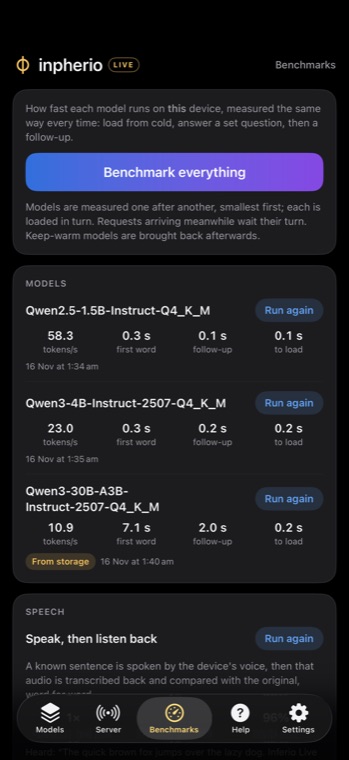
These are from the app's own Benchmarks tab, run on our iPad Pro (M1, 16 GB) and iPhone 17 Pro Max on 16 November 2026. Same prompt every time. Speed is tokens a second while the model writes; a token is roughly three quarters of a word.
iPhone 17 Pro Max (12 GB)
Qwen3 30BFrom storage · 17.3 GB file
10.9tokens/s
Qwen3 4BIn memory · 2.3 GB file
23.0tokens/s
Qwen2.5 1.5BIn memory · 0.9 GB file
58.3tokens/s
iPad Pro (M1, 16 GB)
gpt-oss 120BFrom storage · 58.5 GB file
4.5tokens/s
Qwen3 30BFrom storage · 17.3 GB file
16.5tokens/s
Qwen3 8BIn memory · 4.7 GB file
12.0tokens/s
Qwen2.5 7BIn memory · 4.4 GB file
12.9tokens/s
SmolVLM2 2.2BIn memory · 1.6 GB file
46.6tokens/s
Qwen2.5 1.5BIn memory · 0.9 GB file
48.4tokens/s
Qwen2.5 0.5BIn memory · 0.4 GB file
87.4tokens/s
In memory means the whole model sits in RAM on the graphics chip. From storage means the model is bigger than the device's memory and Live is reading it off flash as it goes. The first reply from a cold model also includes loading it: gpt-oss 120B took 20.4 s to load on the iPad; Qwen3 8B took 5.0 s to load on the iPad; Qwen2.5 7B took 0.7 s to load on the iPad.
Watch it answer
Real requests, played back at real speed.
We sent these to our iPad and iPhone over Wi-Fi on 16 November 2026 and kept every piece of each reply with the moment it arrived. The terminals below replay them with the same timing. Nothing is sped up or tidied.
OpenAI-compatible
Change the base URL. Keep your code.
Live answers on OpenAI's API, so anything that lets you set an OpenAI base URL works with it: the official SDKs, LangChain, LlamaIndex, chat front ends, your own scripts. The Server tab shows the address and the key, and a QR code for setting up another device.
from openai import OpenAI

client = OpenAI(
    base_url="http://ipad.local:8080/v1",
    api_key="the key from the Server tab",
)

reply = client.chat.completions.create(
    model="Qwen3-30B-A3B-Instruct-2507-Q4_K_M",
    messages=[{"role": "user", "content": "Hello from my laptop"}],
)
print(reply.choices[0].message.content)import OpenAI from "openai";
const client = new OpenAI({
baseURL: "http://ipad.local:8080/v1",
apiKey: process.env.LIVE_KEY,
});
const stream = await client.chat.completions.create({
model: "Qwen2.5-7B-Instruct-Q4_K_M",
messages: [{ role: "user", content: "Write a haiku about Wi-Fi" }],
stream: true,
});
for await (const chunk of stream) {
process.stdout.write(chunk.choices[0]?.delta?.content ?? "");
}curl http://ipad.local:8080/v1/audio/transcriptions \
-H "Authorization: Bearer $LIVE_KEY" \
-F [email protected] \
-F model=whisper-1 \
-F response_format=srtcurl http://ipad.local:8080/api/chat \
-H "Authorization: Bearer $LIVE_KEY" \
-d '{
"model": "Qwen2.5-7B-Instruct-Q4_K_M",
"messages": [{"role": "user", "content": "Hi"}],
"stream": false
}'What it answers
| Endpoint | What it does on the device |
|---|---|
POST /v1/chat/completions | Chat, streamed or not. Tool calls, JSON mode and JSON schema (enforced while the model writes, so the output always parses), images for vision models, thinking models with the reasoning sent separately as reasoning_content. |
POST /v1/responses | OpenAI's newer Responses API, with tools and previous_response_id. |
POST /v1/completions | Plain text completion. |
POST /v1/embeddings | Vectors for search and RAG, from Nomic Embed or Qwen3 Embedding. |
POST /v1/audio/speech | Text to speech with Kokoro's neural voices (36 of them, US and UK English and Chinese) or the device's own voices in every language it has. |
POST /v1/audio/transcriptions | Speech to text with Whisper, from Tiny to Large v3 Turbo: 99 languages, word timings, SRT and VTT subtitles. |
POST /v1/audio/translations | Speech in another language straight to English text. |
GET /v1/models | What's on the device, what's loaded, the context window, and whether it runs from memory or storage. |
/api/chat, /api/generate, /api/tags | Ollama's API, for apps built for Ollama. |
Apps that hard-code a model name like gpt-4o still work: switch on "answer any model name" and the default model picks those up.
Loading, keeping warm, letting go
Live looks after the memory for you.
A phone has one pool of memory and one set of fast cores, and iOS will close an app that takes too much. Live keeps track of every megabyte so you don't have to.
Memory for models on the iPad0 of 9.2 GB
On flash
Nothing is loaded when the app starts. The first request that names a model loads it, and the reply says how long loading took. A small model is ready in under a second; a 7B model in a few.
Loads when asked
Name any model on the device in a request and it loads by itself. There's no separate load step in your code.
Keep warm
Mark up to three models to stay ready. They load when the app opens, they're the last to go when room is needed, and if one did have to go it comes back once the device has been quiet for 20 seconds.
Making room
When a new model needs space, the one used longest ago goes first. Then Live checks what iOS says is really free, not just its own sums, because going over is how apps get closed.
One job at a time
Requests queue up and take turns, since two models fighting over the graphics chip are slower than one after the other. A full queue answers 429 with a Retry-After, and a device that's too hot answers 503 rather than cooking itself.
Letting go
A model nobody has used for 30 minutes is unloaded (you can change that, or turn it off). If iOS warns that memory is short, conversation caches go first, then speech models, then the oldest model that isn't kept warm.
Storage models
A model running from storage holds only about 900 MB in memory. One at a time, and while it's loaded the small models get a bit less room, because the big one runs faster the more of it iOS can keep in its file cache.
The app
Everything runs on the device.
One app, one server, one key. Chat, vision, embeddings, speech in both directions, and all of it on the device's own chips.
Chat and thinking models
Llama 3.2, Qwen2.5, Qwen3 (with thinking), gpt-oss, or any GGUF you find on Hugging Face. Search a repository from inside the app and pick the file.
Vision
SmolVLM2, Qwen2.5-VL and Gemma 3 look at the images you send. Models that can't see get the text read out of the picture instead, so "what does this receipt say?" works with any of them.
Embeddings
Nomic Embed v1.5 and Qwen3 Embedding for search over your own documents.
Speech
Kokoro's neural voices and Whisper speech recognition, downloaded once and kept on the device. The built-in iOS voices and recogniser are there too, with nothing to download.
Benchmarks
Measure any model on your own device: load time, first token, speed, with the speech round trip checked word for word. After a download, Live offers to run one.
Private by design
No account and no sign-in. Prompts, audio and replies never leave the device; the only traffic out is the model downloads from Hugging Face. Every request needs your key.
Questions
Before you download it.
Which devices does it run on?
Any iPhone or iPad on iOS 17 or later. Small models run on all of them. For a 7B model you want 8 GB of memory or more, and running from storage is at its best on devices with 8 GB and up: the iPhone 15 Pro and later, and iPads with an M chip. The app tells you how each model will run on your device before you download it.
Can I use it away from home?
It serves your local network: the device and whatever is calling it need to be on the same Wi-Fi (or the same VPN, if you run one). It doesn't open anything to the internet.
Does it drain the battery?
Running a big model is hard work for a phone, so keep it on a charger while it serves. The app watches the temperature and turns requests away with a 503 before the device gets too hot, and a resting screen dims everything after three minutes so a device left serving for days doesn't burn its display.
Does it keep working in the background?
iOS doesn't let apps use the graphics chip in the background. A reply that's already running finishes on the processor in the time iOS allows, then the server pauses and starts again when you open the app. For a device that serves all day, leave Live open on screen.
How is this different from running Ollama on a Mac?
It's the same idea on a device you already carry, with the same API. The difference is the storage trick: a Mac runs a model that fits in its memory, and Live runs mixture-of-experts models that don't fit in the iPhone's or iPad's.
Will it earn money on the Inpherio marketplace?
Not yet. Inpherio Live runs entirely on its own for now. We'll add marketplace earning once the app has settled, and we'll tell everyone using it when that's ready.
What does it cost?
The app is free, with every feature except one: running models bigger than the device's memory is Live Plus, a one-off purchase. No subscription.
Inpherio Live.
Coming to the App Store for iPhone and iPad.